
CS2 FACEIT Cheats
For CS2 FACEIT lobbies only. Includes adjustable aimbot, skeleton/box/health ESP, radar and a stream-proof overlay. Requires Cloud DMA and Windows security settings enabled.
Product Overview
At a glance
Key capabilities
The short list for CS2 FACEIT Cheats, before the full module list.
Another 7 options are in the full list below.
Overview
A dedicated CS2 FACEIT build
Documented functions, prerequisites and scope for this product.
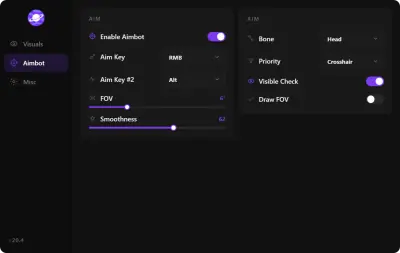
This build brings aim assistance and player information together for CS2 FACEIT lobbies. Choose smooth aim, a target-selection FOV, a target bone and visible check for the aimbot. Use player ESP, skeleton, box, health and radar to read the round from more than the normal game view.
It is a FACEIT-specific product, separate from the public software. Premier and ordinary Valve matchmaking are outside its stated scope. Cloud DMA is required for full functionality, so assess the complete setup before ordering the Windows executable loader.
What the visual features add
Player ESP reveals enemy positions beyond normal line of sight. Skeleton describes posture and orientation; a box provides a simpler player marker; health adds the remaining HP. These are the documented visual elements. Names, distance readouts, weapon labels and team filtering are not confirmed.
Radar adds positional awareness beyond the visible scene. Its exact presentation is not specified, so do not assume a second window, minimap overlay or browser radar. The stream-proof overlay is designed to separate visuals from captured gameplay; supported capture methods need confirmation.
Controls that carry between sessions
Config save and load lets you keep a setup instead of rebuilding it each time. Hotkeys provide keyboard control during play. Default keys, hold/toggle behavior and local versus account-synced storage are not documented. Follow the delivered instructions rather than copying another product’s menu settings.
Smooth aim: shape the movement
Smooth aim controls how gradually the crosshair moves toward a chosen target. It changes the response of the assist rather than adding a different weapon mode. The feature list confirms adjustability but gives no range or recommended value. There is no documented preset that guarantees a particular result.
FOV control: define the selection area
FOV control sets the area around your crosshair in which the aimbot selects targets. A narrower area keeps selection close to your existing crosshair placement; a wider one allows targets farther from it. This is an aimbot selection setting, not a claim that the game’s camera FOV changes.
Bone selection and visible check
Bone selection chooses the part of a player model the assist targets, such as a head or body area. The exact selectable list is not specified. Visible check restricts aimbot selection to visible enemies. Its application to ESP and its handling of individual smoke situations are not established.
ESP during a FACEIT round
Position, posture and health answer different questions. On a site approach, a box identifies where a player is; a skeleton shows the model’s stance; health adds context about that player’s remaining HP. These examples explain the information displayed, not a promise of round wins or a claim that the software replaces map knowledge.
Windows and Cloud DMA prerequisites
Windows 10 and Windows 11 are listed on supported builds. HVCI (memory integrity), Core Isolation, TPM and Secure Boot must be enabled. Exact Windows 11 build numbers are not supplied. Cloud DMA is required for full functionality and has its own infrastructure requirements. The summary does not establish that it is bundled with the main license.
Purchase and installation
Review the access terms on external checkout and confirm the complete Cloud DMA arrangement before paying. Delivery is a Windows executable loader; disk space, runtime packages, game launch order and account linking are not documented here. Use the current setup instructions and contact support for your exact Windows build.
Scope and limits
This is the FACEIT build only. It is not intended for Premier or normal Valve matchmaking. “Built for FACEIT anti-cheat” describes the design target and does not guarantee detection avoidance or a period of safe use. Updates can affect compatibility. HWID Spoofer and Skin Changer are separate catalog products, with no confirmed requirement or FACEIT compatibility in the main summary.
Modules
What's included
The documented feature list for CS2 FACEIT Cheats. Read the descriptions for scope and requirements.
- Aimbot
- Smooth aim
- FOV control
- Bone selection
- Visible check
- Player ESP
- Skeleton ESP
- Box ESP
- Health ESP
- Radar
- Stream-proof overlay
- Config save and load
- Hotkeys
Experience
Feature scope · Setup checks
For CS2 FACEIT lobbies only. Includes adjustable aimbot, skeleton/box/health ESP, radar and a stream-proof overlay. Requires Cloud DMA and Windows security settings enabled.
Illustrative media
- Layer A
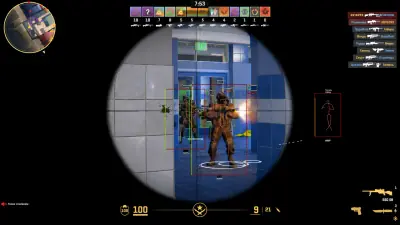
Scoped player overlays
Supplied CS2 gameplay preview with boxes and skeleton outlines around players.
- Layer B
Aimbot menu preview
Aim controls shown in the supplied menu image. Displayed values are examples, not recommended settings.
- Layer C
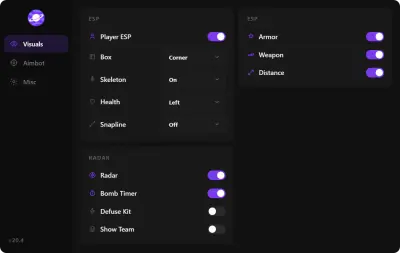
Visuals menu preview
The supplied image shows the ESP and radar control groups.
- Layer D
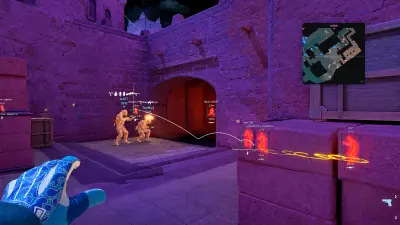
ESP and radar gameplay
Supplied CS2 scene with player overlays and a radar panel above the courtyard.
More products
Pairs well with
Utilities sold beside the cheat. Each one keeps a separate page.
- HWID Spoofer A separate utility for disk, MAC, GPU and related hardware identifiers. It does not remove account sanctions or establish FACEIT support. View details: HWID Spoofer
- Cloud DMA A guided Hyper-V environment on one Windows PC, with encrypted activation. GREENWARD, Static Server and AWS are separate required purchases. View details: Cloud DMA
- Skin Changer Preview weapon finishes, outfits and knife styles where supported. Cosmetics remain client-side and do not become inventory items. View details: Skin Changer
FAQ
Questions about this page
Answers for this page. The FAQ page holds the rest.
Blog
Related guides
Detailed explanations of aim controls, ESP, Cloud DMA, Windows prerequisites and the limits of supporting utilities.
A purchase checklist covering FACEIT-only scope, confirmed features, the Cloud DMA setup and missing compatibility details.
How the four documented aimbot controls differ, what each changes, and which settings are still unspecified.
A practical explanation of the documented ESP elements, their different roles, and the details the feature list does not confirm.
Understand how radar differs from ESP and why window type, map format and display behavior need confirmation.
Separate overlay capture behavior from anti-cheat claims, and identify the recording details to confirm before purchase.

The four enabled security prerequisites, supported Windows scope, and what to confirm about your exact build.