
CS2 FACEIT Aimbot Controls: Smooth Aim, FOV and Target Selection
How the four documented aimbot controls differ, what each changes, and which settings are still unspecified.
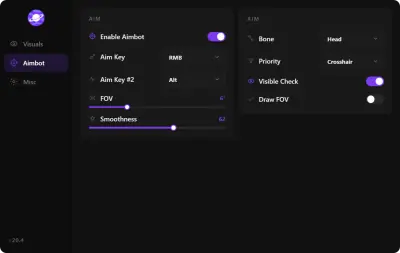
The CS2 FACEIT aimbot has four documented controls: smooth aim, FOV control, bone selection and visible check. They answer different questions about movement, target selection and visibility. Understanding that split is more useful than copying values from a screenshot of another build. This guide explains the controls without inventing sliders, presets or a recommended configuration.
Smooth aim changes the movement toward a target
Smooth aim controls how gradually the crosshair moves toward a selected enemy. Target selection happens first; smoothness then affects how the assist moves. A change in smoothness is therefore different from choosing a new target area or allowing a wider selection radius. The product summary confirms this option but does not give its adjustment range, units or default value.
For example, two configurations could use the same FOV and target bone while producing different movement because their smoothness differs. That explains the setting’s purpose. It does not establish how a specific numeric value behaves in the delivered menu, or how an observer would interpret that movement.
FOV control defines the selection area
FOV control sets the area around the crosshair where the aimbot can choose a target. A smaller area concentrates selection near the player’s own crosshair placement. A wider area permits selection farther away. This is an aim-selection radius; it is not evidence of a camera zoom setting or a change to the game’s display FOV.
No numerical scale, distance limit or per-weapon profile is documented. If a menu image shows those features on another product, that image does not extend the feature list of this FACEIT build. The main product page keeps the documented options together.
Bone selection chooses a model area
Bone selection chooses the part of an enemy model toward which the aimbot aims. Head and torso illustrate why a target-area choice matters, but the supplied summary does not provide a complete selectable list. It also does not confirm automatic bone switching, weapon-specific priority or a separate damage calculation. Keep those questions separate when reviewing the delivered controls.
Visible check limits eligible targets
Visible check restricts the aimbot to enemies the player can see. Its documented scope is the aimbot. It does not establish an equivalent visibility filter for ESP, nor explain every smoke or occlusion case. ESP elements describe information on screen; visible check describes target eligibility for aim assistance.
What to confirm before choosing this build
Hotkeys and config save/load are documented, but default keys, hold-versus-toggle behavior and config storage location are not. Ask support for the current menu documentation if those details affect your decision. There is no confirmed preset that promises a particular appearance, match result or protection from detection.
This software is for FACEIT lobbies only. Premier and standard Valve matchmaking are outside its stated scope. Cloud DMA is required for full functionality, alongside the Windows prerequisites. Review that whole setup before using the product’s purchase link.