
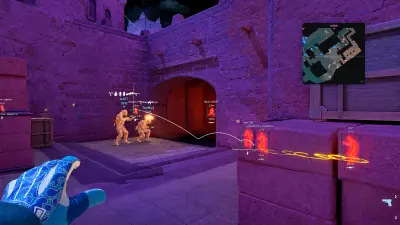
CS2 FACEIT Radar: Positional Awareness and the Unspecified Details
Understand how radar differs from ESP and why window type, map format and display behavior need confirmation.
Radar is listed as a visual feature of the dedicated CS2 FACEIT build. Its purpose is positional awareness beyond the visible scene. The product summary does not describe the interface, so a buyer should not infer a browser radar, a second-monitor window or a minimap overlay from the word alone. This guide separates the useful concept from the unanswered implementation questions.
What positional awareness means here
A radar feature provides position information beyond what is currently in front of the player. In CS2, players move between sites and change position during a round, so this information has a different role from a marker attached directly to a visible model. The summary confirms the radar feature, without documenting its map, update rate or coverage rules.
Consider a rotation as an example of the information problem: a player may leave the current camera view while moving toward another part of the map. A positional display concerns where that player is, whereas skeleton ESP concerns the model’s pose. This explains the distinction without claiming a particular radar layout or behavior.
Radar is not another name for box ESP
Box ESP places a frame around a player model. Skeleton adds posture and health adds remaining HP. Radar belongs to the same visual group but is separately listed. Combining them under a single “wallhack” heading can hide those differences and encourage assumptions about information that has never been confirmed.
Read the ESP breakdown for the documented model-based elements. Neither guide establishes distance text, enemy names or weapon information. Those would require their own product evidence.
Questions that affect the physical setup
Ask whether radar appears inside the game view, in a separate application window or in another format. If you intend to use another screen, confirm that this is supported rather than purchasing hardware on that assumption. Browser access, remote viewing and mobile support are not documented in the summary.
Also ask what map information is displayed and whether the radar has its own hotkey or configuration options. General hotkey and config support is confirmed for the product, but the exact mapping of those controls to radar is not. A general utility feature is not proof of a separate switch for every visual element.
Do not transfer capture claims between features
The product lists a stream-proof overlay, but supported recording methods are unspecified. That is especially relevant if radar turns out to be a separate window. A claim about excluding one overlay from a capture does not automatically cover every window on the desktop. The capture guide explains what to confirm.
A sensible next step before checkout
Review the main product for the full feature group and ask support about the radar presentation if it affects your setup. State the display arrangement you need rather than asking whether radar is “good.” A precise question gives a compatibility answer you can use.
This is a FACEIT-only build, with Cloud DMA required for full functionality. It is not intended for Premier or ordinary Valve matchmaking. Radar does not remove those limits, establish current patch status or guarantee avoidance of anti-cheat detection.