Player ESP
Position at a glance.
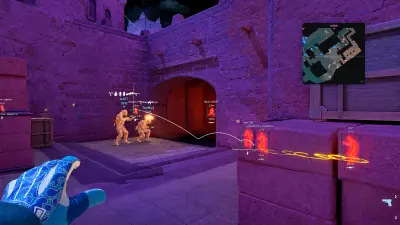
Player ESP marks enemies beyond the normal view, helping you read positions during site takes and rotations.
- Enemy positions
- Skeleton, box and health
- FACEIT build
- Separate from aim
A dedicated FACEIT build with adjustable aimbot, player ESP, radar and a stream-proof overlay. Requires Cloud DMA. For FACEIT lobbies only; Premier and Valve matchmaking are outside its scope.

FACEIT
Dedicated build
Cloud DMA
Required
Windows
10 & 11
Configs
Save & load
Features
Read player position and health, choose how aim assist responds, and keep your settings between sessions. This dedicated CS2 build requires Cloud DMA.
Position at a glance.
Player ESP marks enemies beyond the normal view, helping you read positions during site takes and rotations.
Choose the information you see.
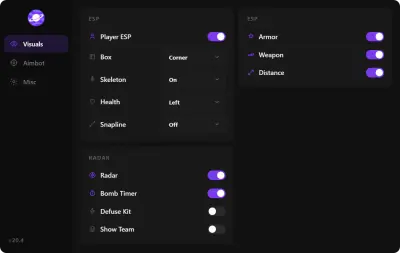
Follow player posture with skeleton ESP, locate a player with a box, or see remaining health before an engagement.
Four documented aim controls.
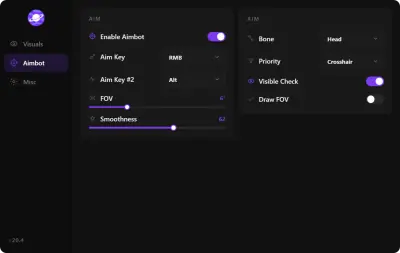
Smooth aim, FOV control, bone selection and visible check let you shape how the assist picks and follows targets.
Gradual crosshair movement.
Control how gradually the crosshair moves toward the selected target. Smooth aim shapes the response of your aim assistance.
Read movement beyond the view.
Follow player positions beyond the current view when reading movement between sites. Radar complements the model-based ESP elements.
Choose the aim focus.
FOV defines the target-selection area around your crosshair. Bone selection chooses the model area the assist aims toward.
Visuals and capture.
The overlay is designed to stay out of captured gameplay. Confirm your recording method before relying on it.
Keep your setup close.
Save and load your chosen settings, then use hotkeys for keyboard control. Return to your configuration between sessions.
Aim at visible targets.
Keep aim assistance tied to enemies in view, with visibility as a condition for target selection.
Store
The FACEIT build and three separate utilities. Cloud DMA is required for the main product; HWID Spoofer and Skin Changer are separate tools with their own scope.
Dedicated aimbot, ESP and radar for FACEIT, with Cloud DMA required.
FACEIT-only software with smooth aim, FOV control, bone selection, visible check, player ESP, radar and a stream-proof overlay.
Review hardware identifier changes and the included cleaner. FACEIT compatibility and any need alongside the main build must be confirmed.
A separate utility for disk, MAC, GPU and related hardware identifiers. It does not remove account sanctions or establish FACEIT support.
The required infrastructure dependency for the FACEIT build. Review the separate Windows, Hyper-V and service requirements.
A guided Hyper-V environment on one Windows PC, with encrypted activation. GREENWARD, Static Server and AWS are separate required purchases.
Local cosmetic previews in supported games. Confirm CS2 and FACEIT compatibility before purchase.
Preview weapon finishes, outfits and knife styles where supported. Cosmetics remain client-side and do not become inventory items.
Why us
Compare the documented capabilities and read the requirements before choosing. Other providers vary; the comparison does not describe every competing product.
FACEIT-specific build
Designed for CS2 FACEIT lobbies. Standard Valve matchmaking and Premier are outside the build’s stated scope.
Aim customization
Smooth aim, FOV control, bone selection and visible check are the four documented aimbot options.
Player information
Player ESP includes skeleton, box and health. Radar adds another view of player positions.
Stream-proof overlay
A capture-separation feature is listed. Supported capture methods still need confirmation for your setup.
Settings you can reuse
Config save/load and hotkeys keep your preferred controls accessible between sessions.
Requirements up front
Cloud DMA is required. Windows 10 or 11 needs HVCI, Core Isolation, TPM and Secure Boot enabled.
4
Aim options
Smooth aim, FOV, bone selection and visible check.
3
ESP elements
Skeleton, box and health are documented individually.
FACEIT
Build scope
A dedicated product, separate from Premier and Valve matchmaking.
Setup guide
Confirm the queue, the Windows prerequisites and the Cloud DMA dependency before you order. Use the supplied installation instructions for the Windows loader.
Check the build’s scope
Check Windows and Cloud DMA
Review delivery and installation
How it works
Confirm the queue, the Windows prerequisites and the Cloud DMA dependency before you order. Use the supplied installation instructions for the Windows loader.
Four setup checks
Check the build’s scope
This product is for CS2 FACEIT only. For Premier or standard Valve matchmaking, choose a product expressly documented for that environment.
Check Windows and Cloud DMA
Windows 10 or 11 requires HVCI, Core Isolation, TPM and Secure Boot enabled. Cloud DMA is required for full functionality.
Review delivery and installation
Read the external checkout terms and current setup documentation. Ask support to confirm your Windows build and unresolved requirements.
Keep your settings
Hotkeys and config save/load are confirmed. Default keys, hold/toggle behavior and local versus account-synced storage are not specified. Do not assume cloud sync from the existence of saved settings.
Blog
Detailed explanations of aim controls, ESP, Cloud DMA, Windows prerequisites and the limits of supporting utilities.
How the four documented aimbot controls differ, what each changes, and which settings are still unspecified.
A practical explanation of the documented ESP elements, their different roles, and the details the feature list does not confirm.
Understand how radar differs from ESP and why window type, map format and display behavior need confirmation.
FAQ
Answers for this page. The FAQ page holds the rest.